
Overview
LCRI requires water systems to prioritize schools and daycares when identifying and replacing lead service lines. These locations serve children, which makes them a sensitive population under the rule. 120Water lets you tag locations as schools or daycares and filter directly to them on the Locations page so your team can find and act on these records quickly.
Step 1: Tag a location as a school or daycare
To use the filter, locations need to be classified first. You can do this one at a time or in bulk.
Single location:
- Go to the Locations page and open the location record.
- Click Edit Details in the top right corner.
- Find the Property Classification field and select one of the school or daycare options from the dropdown.
- Click Save.
In bulk:
If you have multiple schools or daycares to tag at once, use the bulk edit feature to update Property Classification across multiple records. See [How to Use Bulk Edit] for instructions.
Step 2: Filter your locations to get your list
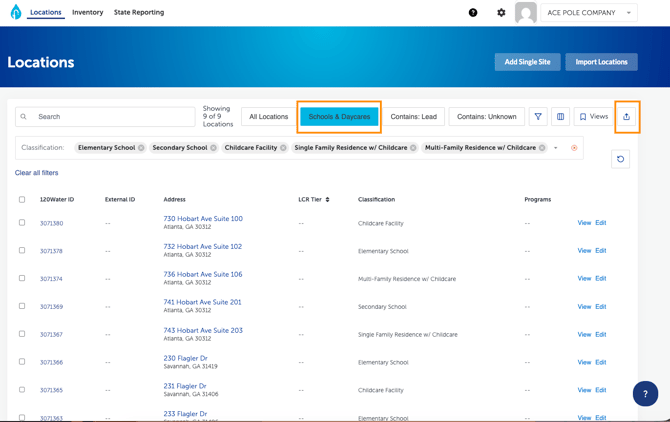
Once your locations have been tagged, click the Schools & Daycares button at the top of the Locations page. To export this list out of the platform, click the upwards arrow to the right of the filter button.
Why this matters
Under LCRI, schools and daycares must be prioritized for lead service line identification and replacement. They're also a specific reporting requirement: water systems must submit a list of all schools and childcare facilities served by the system by November 1, 2027 — the same deadline as your full service line inventory submission.
Keeping these locations tagged and up to date in 120Water means that list is ready when you need it, pulled directly from your existing data rather than built from scratch at deadline.