At-a-Glance Metrics
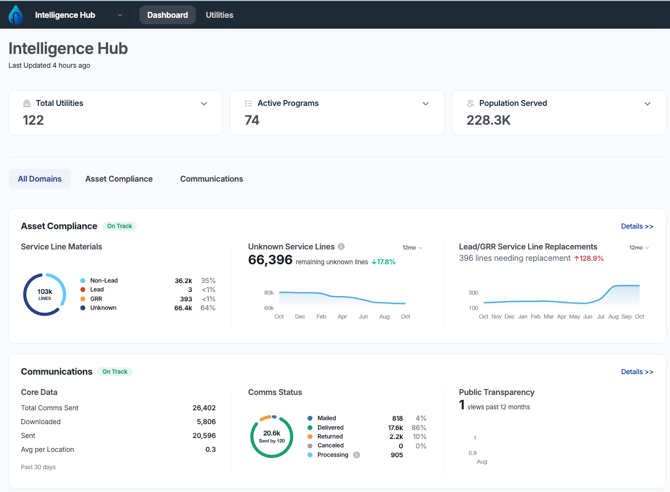
When you first land on the dashboard, you’ll see metric cards displaying:
-
Total Number of Utilities in your account
-
Number of Active Programs
-
Population Served
Asset Compliance
Get a roll-up view of service line material classifications across all water systems in your account, including:
-
Non-Lead
-
Lead
-
GRR (Galvanized Requiring Replacement)
-
Unknown
You'll also see the number of unknowns across all water systems and the number of replacements performed.
Communications
Scrolling down, you’ll find communications data, including:
- Total Comms sent
- Total Comms in each status
- Public Transparency Dashboard views
Filter by Segment
You can tailor your dashboard view by filtering by custom segments you’ve created to focus on specific sets of water systems.
Use this dashboard to track your program's progress, pinpoint areas needing attention, and report on key milestones. For help interpreting dashboard metrics or setting up segments, contact support@120water.com.